About Me

My photo
Author of Groovy modules: GBench, GProf, Co-author of a Java book パーフェクトJava, Game Developer at GREE

Saturday, June 27, 2015

GProf supports Groovy 2.4

GProf, the Groovy Profiler supports Groovy 2.4 in the new release version 0.3.1.

The release already has been available on the Maven Central repository and it means that now you can install GProf by the following one line:

@Grab('org.gperfutils:gprof:0.3.1-groovy-2.4') // v0.3.1 for Groovy 2.4

Here is a demo:

// slow !!
def fib(n) {
    if (n < 2) {
        n
    } else {
        fib(n - 1) + fib(n - 2)
    }
}

profile {
    fib(20)
}.prettyPrint()
and the output will be like this:
Flat:

 %    cumulative   self            self     total    self     total   self     total
time   seconds    seconds  calls  ms/call  ms/call  min ms   min ms  max ms   max ms  name
46.8        0.82     0.82      2   411.11   875.84  366.64   786.45  455.58   965.22  Prof.fib
35.1        1.43     0.61  21890     0.02     0.02    0.00     0.00    3.76     3.76  java.lang.Integer.minus
17.9        1.75     0.31  10945     0.02     0.02    0.00     0.00    1.79     1.79  java.lang.Integer.plus
 0.0        1.75     0.00      1     0.74  1753.00    0.74  1753.00    0.74  1753.00  Prof$_run_closure1.fib
 0.0        1.75     0.00      1     0.14  1753.15    0.14  1753.15    0.14  1753.15  Prof$_run_closure1.doCall

Call graph:

index  % time  self  children  calls        name
               0.00      1.75          1/1      
[1]     100.0  0.00      1.75            1  Prof$_run_closure1.doCall [1]
               0.00      1.75          1/1      Prof$_run_closure1.fib [2]
-----------------------------------------------------------------------------
               0.00      1.75          1/1      Prof$_run_closure1.doCall [1]
[2]      99.9  0.00      1.75            1  Prof$_run_closure1.fib [2]
               0.82      0.92          2/2      Prof.fib [3]
               0.00      0.00      2/21890      java.lang.Integer.minus [4]
               0.00      0.00      1/10945      java.lang.Integer.plus [5]
-----------------------------------------------------------------------------
               0.82      0.92          2/2      Prof$_run_closure1.fib [2]
[3]      99.9  0.82      0.92      2+21888  Prof.fib [3]
               0.61      0.00  21888/21890      java.lang.Integer.minus [4]
               0.31      0.00  10944/10945      java.lang.Integer.plus [5]
-----------------------------------------------------------------------------
               0.00      0.00      2/21890      Prof$_run_closure1.fib [2]
               0.61      0.00  21888/21890      Prof.fib [3]
[4]      35.1  0.61      0.00        21890  java.lang.Integer.minus [4]
-----------------------------------------------------------------------------
               0.00      0.00      1/10945      Prof$_run_closure1.fib [2]
               0.31      0.00  10944/10945      Prof.fib [3]
[5]      17.9  0.31      0.00        10945  java.lang.Integer.plus [5]
-----------------------------------------------------------------------------

Last of all,

I'm sorry for the late release and thanks for kicking my butt!

Saturday, February 14, 2015

GBench 0.4.3 released - Let's benchmark "as" operator in Groovy 2.4 and 2.3.

Today, I released version 0.4.3 of GBench, the benchmarking module for Groovy.

The release is a maintenance release, but it includes a new feature, anonymous (unlabeled) code block syntax. The syntax makes your benchmarking code simpler when you have only one code block to be benchmarked.

// benchmark {
//   label {
//     // code to be benchmarked
//   }
// }

benchmark {
  // code to be benchmarked
}

Let's benchmark using the syntax. This time's target is "Optimization of primitive type conversions with the as operator (GROOVY-7140)". I wrote a the following benchmarking code:

// Bench.groovy
import groovy.transform.CompileStatic

@CompileStatic
void test(char x) {
    ((((x as byte) as short) as int) as long)
}

benchmark {
    test('a')
}.prettyPrint()

Here are the results of the code above with Groovy 2.3.0 and 2.4.0 in my environment.

$ grape install org.gperfutils gbench 0.4.3-groovy-2.3
$ gvm use groovy 2.3.0
$ groovy -cp `find ~/.m2 -name gbench-0.4.3-groovy-2.3.jar` Bench.groovy
Environment
===========
* Groovy: 2.3.0
* JVM: Java HotSpot(TM) 64-Bit Server VM (24.75-b04, Oracle Corporation)
    * JRE: 1.7.0_75
    * Total Memory: 491.5 MB
    * Maximum Memory: 910.5 MB
* OS: Mac OS X (10.10.1, x86_64)

Options
=======
* Warm Up: Auto (- 60 sec)
* CPU Time Measurement: On

   user  system   cpu  real

   1822       3  1825  1828
$ grape install org.gperfutils gbench 0.4.3-groovy-2.4
$ gvm use groovy 2.4.0
$ groovy -cp `find ~/.m2 -name gbench-0.4.3-groovy-2.4.jar` Bench.groovy
Environment
===========
* Groovy: 2.4.0
* JVM: Java HotSpot(TM) 64-Bit Server VM (24.75-b04, Oracle Corporation)
    * JRE: 1.7.0_75
    * Total Memory: 491.5 MB
    * Maximum Memory: 910.5 MB
* OS: Mac OS X (10.10.1, x86_64)

Options
=======
* Warm Up: Auto (- 60 sec)
* CPU Time Measurement: On

   user  system   cpu  real

   1543       3  1546  1549

It seems no doubt that the performance of "as" operator was improved in Groovy 2.4.0. So how did they make it? The difference between the following bytecode snippets is the answer.

Groovy 2.3.0

  public void test(char);
    Code:
       0: iload_1
       1: invokestatic  #74                 // Method java/lang/Character.valueOf:(C)Ljava/lang/Character;
       4: getstatic     #80                 // Field java/lang/Byte.TYPE:Ljava/lang/Class;
       7: invokestatic  #84                 // Method org/codehaus/groovy/runtime/ScriptBytecodeAdapter.asType:(Ljava/lang/Object;Ljava/lang/Class;)Ljava/lang/Object;
      10: invokestatic  #90                 // Method org/codehaus/groovy/runtime/typehandling/DefaultTypeTransformation.byteUnbox:(Ljava/lang/Object;)B
      13: invokestatic  #93                 // Method java/lang/Byte.valueOf:(B)Ljava/lang/Byte;
      16: getstatic     #96                 // Field java/lang/Short.TYPE:Ljava/lang/Class;
      19: invokestatic  #84                 // Method org/codehaus/groovy/runtime/ScriptBytecodeAdapter.asType:(Ljava/lang/Object;Ljava/lang/Class;)Ljava/lang/Object;
      22: invokestatic  #100                // Method org/codehaus/groovy/runtime/typehandling/DefaultTypeTransformation.shortUnbox:(Ljava/lang/Object;)S
      25: invokestatic  #103                // Method java/lang/Short.valueOf:(S)Ljava/lang/Short;
      28: getstatic     #106                // Field java/lang/Integer.TYPE:Ljava/lang/Class;
      31: invokestatic  #84                 // Method org/codehaus/groovy/runtime/ScriptBytecodeAdapter.asType:(Ljava/lang/Object;Ljava/lang/Class;)Ljava/lang/Object;
      34: invokestatic  #110                // Method org/codehaus/groovy/runtime/typehandling/DefaultTypeTransformation.intUnbox:(Ljava/lang/Object;)I
      37: invokestatic  #113                // Method java/lang/Integer.valueOf:(I)Ljava/lang/Integer;
      40: getstatic     #116                // Field java/lang/Long.TYPE:Ljava/lang/Class;
      43: invokestatic  #84                 // Method org/codehaus/groovy/runtime/ScriptBytecodeAdapter.asType:(Ljava/lang/Object;Ljava/lang/Class;)Ljava/lang/Object;
      46: invokestatic  #120                // Method org/codehaus/groovy/runtime/typehandling/DefaultTypeTransformation.longUnbox:(Ljava/lang/Object;)J
      49: pop2
      50: return

Groovy 2.4.0

  public void test(char);
    Code:
       0: iload_1
       1: i2b
       2: i2s
       3: i2l
       4: pop2
       5: return

Friday, November 8, 2013

Build OpenJFX 8 on OS X 10.9 Mavericks

1. Clone OpenJFX 8.
$ openjfx% hg clone http://hg.openjdk.java.net/openjfx/8/graphics/rt
$ openjfx% cd rt
2. Checkout a tag for your JDK.
$ openjfx/rt% java -version  2>&1 | grep "build 1.8"
Java(TM) SE Runtime Environment (build 1.8.0-ea-b111)
$ openjfx/rt% hg checkout 8.0-b111
3. Set properties for Mavericks.
$ openjfx/rt% cat gradle.properties
MACOSX_MIN_VERSION=10.9
MACOSX_JDK_FRAMEWORK=/Applications/Xcode.app/Contents/Developer/Platforms/MacOSX.platform/Developer/SDKs/MacOSX10.9.sdk/System/Library/Frameworks/JavaVM.framework
4. Build jfxrt.jar.
$ openjfx/rt% gradle jfxrtMac
5. (If you want to use OpenJFX as default) Replace the bundled jar with the jar you built.
$ openjfx/rt% sudo mv $JAVA_HOME/jre/lib/ext/jfxrt.jar $JAVA_HOME/jre/lib/ext/jfxrt.jar.orig
$ openjfx/rt% sudo cp build/mac-sdk/rt/lib/ext/jfxrt.jar $JAVA_HOME/jre/lib/ext/jfxrt.jar
That's it. Enjoy the open source JavaFX ;)

Saturday, September 14, 2013

GProf 0.3.0 is out!

Today I released the Groovy profiler, GProf 0.3.0. GProf is a profiling module for Groovy which is developed in GPerfUtils project at http://gperfutils.org. The release includes the GNU profiler compatible call graph report and many improvements. You can read all the changes at https://code.google.com/p/gprof/wiki/ReleaseNotes030).

The release already has been available on the Maven Central repository and it means that now you can install GProf by the following one line:

@Grab('org.gperfutils:gprof:0.3.0-groovy-2.1') // v0.3.0 for Groovy 2.1

Here is a demo:

// slow !!
def fib(n) {
    if (n < 2) {
        n
    } else {
        fib(n - 1) + fib(n - 2)
    }
}

profile {
    fib(20)
}.prettyPrint()
and the output will be like this:
Flat:

 %    cumulative   self            self     total    self    total   self    total
time   seconds    seconds  calls  ms/call  ms/call  min ms  min ms  max ms  max ms  name
54.3        0.29     0.29      2   145.86   267.78   38.14   58.56  253.57  477.00  demo.fib
30.4        0.45     0.16  21890     0.00     0.00    0.00    0.00    0.80    0.80  java.lang.Integer.minus
15.0        0.53     0.08  10945     0.00     0.00    0.00    0.00    0.83    0.83  java.lang.Integer.plus
 0.1        0.53     0.00      1     1.05   537.10    1.05  537.10    1.05  537.10  demo$_run_closure1.fib
 0.0        0.53     0.00      1     0.13   537.23    0.13  537.23    0.13  537.23  demo$_run_closure1.doCall

Call graph:

index  % time  self  children  calls        name
               0.00      0.53          1/1      
[1]     100.0  0.00      0.53            1  demo$_run_closure1.doCall [1]
               0.00      0.53          1/1      demo$_run_closure1.fib [2]
-----------------------------------------------------------------------------
               0.00      0.53          1/1      demo$_run_closure1.doCall [1]
[2]      99.9  0.00      0.53            1  demo$_run_closure1.fib [2]
               0.29      0.24          2/2      demo.fib [3]
               0.00      0.00      2/21890      java.lang.Integer.minus [4]
               0.00      0.00      1/10945      java.lang.Integer.plus [5]
-----------------------------------------------------------------------------
               0.29      0.24          2/2      demo$_run_closure1.fib [2]
[3]      99.6  0.29      0.24      2+21888  demo.fib [3]
               0.16      0.00  21888/21890      java.lang.Integer.minus [4]
               0.08      0.00  10944/10945      java.lang.Integer.plus [5]
-----------------------------------------------------------------------------
               0.00      0.00      2/21890      demo$_run_closure1.fib [2]
               0.16      0.00  21888/21890      demo.fib [3]
[4]      30.4  0.16      0.00        21890  java.lang.Integer.minus [4]
-----------------------------------------------------------------------------
               0.00      0.00      1/10945      demo$_run_closure1.fib [2]
               0.08      0.00  10944/10945      demo.fib [3]
[5]      15.0  0.08      0.00        10945  java.lang.Integer.plus [5]
-----------------------------------------------------------------------------

I welcome any requests or feedback.

Thursday, May 2, 2013

GBench Goodness: Compare the performance of different versions of Groovy using GVM

As I announced in my last post, "GProf Goodness: Profile a fork/join program written in GPars", I started Goodness series for GPerfUtils (GBench and GProf). And now it's the turn of GBench.

GBench is the benchmarking module of Groovy. It allow you to accurately and easily benchmark a Groovy program. GVM is a tool for managing parallel versions of Groovy and other Groovy-related tools. By combining the tools, you can easily compare the performance of different versions of Groovy. This is a script to compare the performance of Fibonacci number calculation among v1.7.11, v1.8.9, v2.0.8, and v2.1.3 (you have to install GVM first if you haven't done it yet).

#!/bin/bash
source ~/.gvm/bin/gvm-init.sh
 
versions=(1.7.11 1.8.9 2.0.8 2.1.3)
 
for version in ${versions[*]}
do
  echo -n "Install groovy v${version}"
  gvm install groovy $version
done
 
echo "Okie-dokie, let's benchmark them!"
 
for version in ${versions[*]}
do
  gvm use groovy $version > /dev/null &&
  running_version=$(groovy -v | cut -d' ' -f 3) &&
  major_version=$(echo $running_version | cut -d'.' -f1,2) &&

  groovy -e "
    @Grab('org.gperfutils:gbench:0.4.2-groovy-${major_version}')
    def fib(int n) {
        (n < 2) ? 1 : fib(n - 1) + fib(n - 2)
    }
    // benchmark() extension is supported only in Groovy 2.0 or later versions.
    new groovyx.gbench.BenchmarkBuilder().run(quiet:true, measureCpuTime:false) {
        'v${major_version}' { fib(20) }
    }.prettyPrint()
  " &&

  sleep 1
done

[NOTE] If you face "gvm: command not found" error, try the following approach until my pull request for fixing the issue is merged to GVM.

  1. Download gvm-include.sh from my Gists
  2. Make gvm-include.sh executable by "chmod +x gvm-include.sh"
  3. Replace "source ~/.gvm/bin/gvm-include.sh" in the benchmark script to "source /path/to/gvm-include.sh"

This is the results of the script in my environment. This shows us that the performance of numeric operations were highly improved in v1.8 at least:

v1.7  870633
v1.8  535506
v2.0  507253
v2.1  489244

Please send me pull requests at the Github page or any issues, requests to the Issue page to improve GBench.

Friday, April 26, 2013

GProf Goodness: Profile a fork/join program written in GPars

I just started to write Goodness series for GPerfUtils (GBench and GProf) like the great Groovy Goodness series by Hubert Klein. And this is the first post of GProf Goodness.

First of all, I should explain about GProf. GProf is the profiling module for Groovy. The purpose of the module is agile profiling. It means that you can profile Groovy program whenever and wherever you want. You don't have to go through lengthy tiresome procedure.

OK, let's back to the topic. GProf supports multi-threaded programs. The following example is to profile a fork/join example of GPars from the GPars user guide.

// prof.groovy
@Grab('org.gperfutils:gprof:0.2.0')

import static groovyx.gpars.GParsPool.runForkJoin
import static groovyx.gpars.GParsPool.withPool

profile {
  withPool(2) { pool ->
      println """Number of files: ${
          runForkJoin(new File("./src")) {file ->
              long count = 0
              file.eachFile {
                  if (it.isDirectory()) {
                      forkOffChild(it)       //fork a child task
                  } else {
                      count++
                  }
              }
              return count + (childrenResults.sum(0))
              //use results of children tasks to calculate and store own result
          }
      }"""
  }
}.prettyPrint()
The results will be like this:
Number of files: 2145
%      calls  total ms  ms/call  min ms  max ms  method                   class
29.47      1    342.87   342.87  342.87  342.87  runForkJoin              groovyx.gpars.forkjoin.ForkJoinUtils
14.87   2403    173.04     0.07    0.05    4.09  doCall                   prof$_run_closure1_closure2_closure3_closure4
 9.41   2403    109.51     0.05    0.03    4.06  isDirectory              java.io.File
 9.16    259    106.61     0.41    0.11    9.08  eachFile                 java.io.File
 8.83    259    102.72     0.40    0.10   21.59  doCall                   prof$_run_closure1_closure2_closure3
 4.80   2145     55.81     0.03    0.02    2.80  next                     java.lang.Long
 3.61      1     42.00    42.00   42.00   42.00  use                      groovyx.gpars.GParsPool
 2.90      1     33.73    33.73   33.73   33.73  call                     prof$_run_closure1_closure2
 2.53      1     29.39    29.39   29.39   29.39  withExistingPool         groovyx.gpars.GParsPool
 2.46    258     28.68     0.11    0.04   14.86  forkOffChild             prof$_run_closure1_closure2_closure3
 1.92      1     22.34    22.34   22.34   22.34  createPool               groovyx.gpars.GParsPool
 1.56      2     18.12     9.06    4.99   13.13  withPool                 groovyx.gpars.GParsPool
 1.43    258     16.66     0.06    0.04    4.32  forkOffChild             prof$_run_closure1_closure2_closure3_closure4
 1.40    409     16.24     0.04    0.02    0.93  plus                     java.lang.Long
 1.28    258     14.89     0.06    0.04    0.84  forkOffChild             groovyx.gpars.forkjoin.FJWorker
 0.94      1     10.93    10.93   10.93   10.93  println                  prof$_run_closure1_closure2
 0.80    108      9.27     0.09    0.04    0.71  sum                      java.util.Arrays$ArrayList
 0.75      1      8.67     8.67    8.67    8.67  runForkJoin              groovyx.gpars.GParsPool
 0.64    151      7.48     0.05    0.02    1.86  sum                      java.util.Collections$EmptyList
 0.36      1      4.18     4.18    4.18    4.18  asType                   groovyx.gpars.GParsPool$_createDefaultUncaughtExceptionHandler_closure4
 0.25    108      2.85     0.03    0.02    0.05  plus                     java.lang.Integer
 0.20      1      2.28     2.28    2.28    2.28  getAt                    [Ljava.lang.String;
 0.10      1      1.13     1.13    1.13    1.13  ctor                     jsr166y.ForkJoinPool
 0.06      2      0.68     0.34    0.03    0.66  size                     [Ljava.lang.Object;
 0.05      1      0.61     0.61    0.61    0.61  isCase                   groovy.lang.IntRange
 0.05      1      0.61     0.61    0.61    0.61  minus                    java.lang.Integer
 0.05      1      0.61     0.61    0.61    0.61  retrieveCurrentPool      groovyx.gpars.GParsPool
 0.04      1      0.44     0.44    0.44    0.44  toInteger                java.lang.String
 0.03      1      0.32     0.32    0.32    0.32  retrieveDefaultPoolSize  groovyx.gpars.util.PoolUtils
 0.02      2      0.21     0.10    0.07    0.14  doCall                   groovyx.gpars.GParsPool$_withExistingPool_closure1
 0.01      1      0.11     0.11    0.11    0.11  leftShift                groovyx.gpars.ThreadLocalPools
 0.01      1      0.11     0.11    0.11    0.11  shutdown                 jsr166y.ForkJoinPool
 0.01      1      0.09     0.09    0.09    0.09  awaitTermination         jsr166y.ForkJoinPool
 0.01      2      0.09     0.04    0.04    0.05  getAt                    [Ljava.lang.Object;
 0.01      1      0.07     0.07    0.07    0.07  ctor                     groovyx.gpars.ThreadLocalPools
 0.01      1      0.07     0.07    0.07    0.07  pop                      groovyx.gpars.ThreadLocalPools
 0.00      1      0.05     0.05    0.05    0.05  ctor                     java.io.File
 0.00      1      0.04     0.04    0.04    0.04  asType                   prof$_run_closure1_closure2_closure3

Also, you can choose threads that you are interested in by includeThreads and excludesThreads options. The following change is to profile only worker threads which GPars gives a name starting with "ForkJoinPool". The options allow "*" and "?" wildcards. You don't have to specify the names of all the threads.

// profile {
profile(includeThreads: [ "ForkJoinPool*" ]) {
    ...
}.prettyPrint()
The results will be changed like this:
Number of files: 2145
%      calls  total ms  ms/call  min ms  max ms  method        class
27.42   2403    268.07     0.11    0.07    4.12  doCall        prof$_run_closure1_closure2_closure3_closure4
21.63   2403    211.49     0.09    0.04   52.46  isDirectory   java.io.File
14.20   2145    138.80     0.06    0.03   51.11  next          java.lang.Long
13.61    259    133.05     0.51    0.12   13.41  eachFile      java.io.File
 9.40    259     91.94     0.35    0.14   12.16  doCall        prof$_run_closure1_closure2_closure3
 3.54    258     34.61     0.13    0.05   15.03  forkOffChild  prof$_run_closure1_closure2_closure3
 2.58    409     25.22     0.06    0.03    4.28  plus          java.lang.Long
 1.98    258     19.39     0.08    0.05    1.20  forkOffChild  groovyx.gpars.forkjoin.FJWorker
 1.95    258     19.06     0.07    0.05    0.52  forkOffChild  prof$_run_closure1_closure2_closure3_closure4
 1.66    108     16.18     0.15    0.06    3.94  sum           java.util.Arrays$ArrayList
 1.15    108     11.20     0.10    0.03    6.34  plus          java.lang.Integer
 0.90    151      8.81     0.06    0.03    1.97  sum           java.util.Collections$EmptyList

Please send me pull requests at the Github page or any issues, requests to the Issue page to improve GProf.

Saturday, April 20, 2013

This is the logo for GProf and GBench!!

I just drew the logo for GPerfUtils project that has GProf and GBench. I am not a good artist but I personally like the logo that is based on the Groovy Duke. How about you?
And this is the sketch.

Sunday, April 14, 2013

GProf 0.2.0 is out!

Today I released GProf 0.2.0! GProf is a profiling module for Groovy which is developed in GPerfUtils project at http://gperfutils.org. GBench which is a benchmarking module for Groovy is also a subproject of GPerfUtils. The release already has been available on the Maven Central repository and it means that now you can install GProf by the following one line:
@Grab('org.gperfutils:gprof:0.2.0')
The release includes big enhancements and important bug fixes. The changes are as follows (you can read it also at https://raw.github.com/gperfutils/gprof/master/NEWS):
Support multi-threaded applications

Support Grape

Add includeMethods and excludeMethods options that filter by the name of packages,
classes and methods:

    It supports the following wildcards:

        | * | zero or more characters |
        | ? | exactly one character   |

    The following example profile only methods which are of "java.*" or "groovy.*"
    package but are not constructors:

        profile(
            includeMethods: [ "java.*", "groovy.*" ],
            excludeMethods: [ "*.ctor" ]) {
            // code to be profiled
        }

Add includeThreads and excludeThreads options that filter by the name of threads:

    It supports the following wildcards:

        | * | zero or more characters |
        | ? | exactly one character   |

    The following example profile only methods which are called in the "thread-*"
    thread but not in "thread-2" or "thread-3":

        profile(
            includeThreads: [ "thread-*" ],
            excludeThreads: [ "thread-2", "thread-3" ]) {
            // code to be profiled
        }

Bug fixes:

- #3: GProf fails to profile a multi-threaded application
- #4: Contains the time of children if the depth is more than two
- #6: There are classes that are not profiled
Enjoy ;)

Wednesday, April 3, 2013

GProf was just born!

GProf a.k.a. Groovy gprof was just born Yesterday [https://code.google.com/p/gprof/]. GProf is a profiler for Groovy [http://groovy.codehaus.org/]. It allows you to determine which parts of a program are taking most of the execution time like GNU gprof does for C, C++.

For example, in the following code, GProf shows you that YourApp has two slow operation; one is a task that is short but repeated many times and another is a long task.

class YourApp {
    void start() {
        def foo = new Foo()
        for (int i = 0; i < 100; i++) {
            foo.doShortTask()
        }
        def bar = new Bar()
        bar.doLongTask()
    }
}

class Bar {
    void doLongTask() {
        for (int i = 0; i < 1000000; i++);
    }
}

class Foo {
    void doShortTask() {
        for (int i = 0; i < 10000; i++);
    }
}

profile {  // or new gprof.Profiler().run {
    new YourApp().start()
}.prettyPrint()

/* stdout
%      calls  total ms  ms/call  min ms  max ms  method       class
47.59      1     54.33    54.33   54.33   54.33  doLongTask   Bar
40.05    100     45.72     0.46    0.29    2.09  doShortTask  Foo
11.92      1     13.61    13.61   13.61   13.61  start        YourApp
 0.18      1      0.21     0.21    0.21    0.21  ctor         YourApp
 0.13      1      0.14     0.14    0.14    0.14  ctor         Bar
 0.13      1      0.14     0.14    0.14    0.14  ctor         Foo
*/
Please try GProf and send me your feecback. Enjoy!

Monday, March 25, 2013

GBench 0.4.2 released!

Today I released GBench 0.4.2, the benchmarking module of Groovy http://groovy.codehaus.org/. The release includes new system properties and fixes for providing more exact benchmark. Please check the release notes https://code.google.com/p/gbench/wiki/ReleaseNotes042 or visit the project site https://code.google.com/p/gbench/ for more info.

And now I started developing GBench 0.5.0. If you have requests or anything for this module, please send me a message or add a new issue to https://code.google.com/p/gbench/issues/list. Enjoy!

Saturday, March 16, 2013

GBench tutorial is now available!

For open source projects, one of the most important is without any doubt documentation. For example, Groovy project declared that they will make efforts to improve their documents few days ago: http://groovy.329449.n5.nabble.com/ANN-Documentation-effort-and-site-redesign-td5712875.html

Therefore, I also wrote a tutorial for GBench, the benchmarking module for Groovy: https://code.google.com/p/gbench/wiki/BenchmarkBuilderTutorial

It is a bit short but I hope this document helps your Groovy life as much as possible :)

Friday, March 8, 2013

GBench 0.4.1 released!

Today I released GBench 0.4.1, the benchmarking module of Groovy. The release includes an important bug fix for Invokedynamic. Please visit the GBench project site https://code.google.com/p/gbench/ for more info.

Saturday, December 22, 2012

Multiple Dispatch in Modern JVM Languages

What is dispatch?

"dispatch" in the context of object-oriented languages means that calling one of subroutines that have the same names by checking the parameters dynamically. There are multiple and single for dispatch. I'll write about dispatch and its support in Java and other modern JVM languages in this post.

Java

Java is "single dispatch". I'll describe it with an example of handling touch events. Let me assume that there are classes that express touch events and they have parent class named TouchEvent, also, there is TouchEventHandler that handles touch events (the y might have a virtual upper layer in an actual API).

class TouchEvent {}
 
class TouchStartEvent extends TouchEvent {}
class TouchMoveEvent extends TouchEvent {}
class TouchEndEvent extends TouchEvent {}
class TouchCancelEvent extends TouchEvent {}
 
class TouchEventHandler {
    void handle(TouchEvent e) {}
} 

Let me assume that you want to create a handler that changes behaviour depending on if the the parameter is TouchEvent or TouchStartEvent. I guess that you will write code like this if you expect subtype polymorphism.

class MyTouchEventHandler extends TouchEventHandler {
    public void handle(TouchEvent e) {
        System.out.println("... ?:(");
    }
    public void handle(TouchStartEvent e) {
        System.out.println("touch started :)");
    }
}

But the code doesn't work well.

TouchEventHandler h = new MyTouchEventHandler();
h.handle(new TouchStartEvent()); // prints "... ?:("

Java refers MyTouchEventHandler but it calls handle(TouchEvent) but not handle(TouchStartEvent). In more technical terms, Java resolves the type of the receiver dynamically but resolves the other parameters statically when sending the message. This is called "single dispatch". I'll modify the code to enhance the gap between expect for the code and compiler's opinion.

class MyTouchEventHandler extends TouchEventHandler {
    @Override public void handle(TouchEvent e) {
        System.out.println("... :(");
    }
    @Override public void handle(TouchStartEvent e) {
        System.out.println("It's my turn! :)");
    }
}

Then compiler will say

src/Overloading.java:19: error: method does not override or implement a method from a supertype
    @Override public void handle(TouchStartEvent e) {
    ^

There is a way to simulate "multiple dispatch" in Java code (without tricks in compilation phase) and I'll describe it in the following section about Xtend.

Xtend

Xtend is a relatively new JVM language that has appeared in the last year ("relatively" means that a new JVM language has appeared in this year too). Xtend is "single dispatch" as Java, but it also supports "multiple dispatch" by "dispatch" keyword.

class MyTouchEventHandler extends TouchEventHandler {
    def dispatch void handle(TouchEvent e) {
        println("... :(")
    }
    def dispatch void handle(TouchStartEvent e) {
        println("touch started :)")
    }
}

val TouchEventHandler h = new MyTouchEventHandler()
h.handle(new TouchStartEvent()) // prints "touch started :)"

It's easy to grasp what Xtend does because Xtend generates Java files instead of class files. Xtends puts a proxy method that delegates to methods have "dispatch" keyword. This is the way to simulate "multiple dispatch" in Java that I mentioned before.

public class MyTouchEventHandler extends TouchEventHandler {
  protected void _handle(final TouchEvent e) {
    InputOutput.<String>println("... :(");
  }
 
  protected void _handle(final TouchStartEvent e) {
    InputOutput.<String>println("touch started :)");
  }
 
  public void handle(final TouchEvent e) {
    if (e instanceof TouchStartEvent) {
      _handle((TouchStartEvent)e);
      return;
    } else if (e != null) {
      _handle(e);
      return;
    } else {
      throw new IllegalArgumentException("Unhandled parameter types: " +
        Arrays.<Object>asList(e).toString());
    }
  }
}

I think that using one underscore for prefix isn't nice because programmers need to worry about naming collision but let's leave it aside for now. My interest is why Xtend is "single dispatch" by default. I asked the question to Sven Efftinge who is one of the authors of Xtend and he answered "because changing method resolution would impose many interop issues with existing Jave libs". I guess it's unhappy that spoiling writability of new lauguage for taking care about bad old Java code depend on "single dispatch" but it might be because that I have never had an awful experience. Anyway, Xtend supports "multiple dispatch".

Groovy

Groovy is "multiple dispatch". The example for Java works perfectly in Groovy as expected. It is so intuitive.

TouchEventHandler h = new MyTouchEventHandler();
h.handle(new TouchStartEvent()); // prints "touch started :)"

The type of the parameters are detected dynamically and handle(TouchStartEvent) is called. I'll explain more details. Groovy replaces the method call with a CallSite object that has the caller class, the index for the call, and the method name. It is like this by expressing in code.

TouchEventHandler h = new MyTouchEventHandler();
CallSite handleN = // create a call site for the "n:handle"
handleN.call(h, new TouchStartEvent());

CallSite searches the target method gradually by listing up the meta data of "handle" methods of MyTouchEventHandler and checking the number and the type of the parameters. Of course this dynamic resolution comes at a cost but CallSite caches the method and will call the method immediately at the second time. Recent Groovy has @StaticCompile that is an annotation for turning off dynamic capabilities. Where use the annotation is compiled to binary that doesn't use CallSites and calls methods statically. In that case "multiple dispatch" doesn't work.

Others

I checked a bit about "multiple dispatch" support of other JVM languages. It is seemed that Clojure has "defmulti" macro corresponds to "dispatch" keyword of Xtend. Scala doesn't support but they might say that it's unnecessary because of powerful pattern matching. JRuby and Jython don't support because Ruby and Python don't support it. I'm wondering also about Kotlin but I'll end this post here because I'm full :-P

Sunday, September 2, 2012

SmileyFX: Smiley for JavaFX

Smiley ☺ is often used in graphical programs. SmileyFX is a library that allows to easily create Smiley in JavaFX. You can make a Smiley just as follows using SmileyFX:

Node smiley = SmileyFX.smiley(40);

That's it! The code creates a 40 pixel diameter (20x20xπ pixels) Smiley. Here is a perfect example in JavaFX and GroovyFX:

import javafx.application.Application;
import javafx.scene.Group;
import javafx.scene.Node;
import javafx.scene.Scene;
import javafx.scene.SceneBuilder;
import javafx.stage.Stage;
import smileyfx.SmileyFX;


public class JavaFXDemo extends Application {

    @Override
    public void start(Stage stage) throws Exception {
        Node smiley = SmileyFX.smiley(40);
        Scene canvas = SceneBuilder.create()
            .root(new Group(smiley))
            .width(160)
            .height(160)
            .build(); 
        
        // center align
        smiley.layoutXProperty().bind(
            canvas.widthProperty()
            .subtract(smiley.getLayoutBounds().getWidth())
            .divide(2));
        smiley.layoutYProperty().bind(
            canvas.heightProperty()
            .subtract(smiley.getLayoutBounds().getHeight())
            .divide(2));
        
        // scale by window resize
        smiley.scaleXProperty().bind(
            canvas.widthProperty()
            .divide(canvas.getWidth()));
        smiley.scaleYProperty().bind(
            canvas.heightProperty()
            .divide(canvas.getHeight()));
        
        stage.setScene(canvas);
        stage.setTitle("Smiley FX");
        stage.show();
    }
    
    public static void main(String[] args) {
        launch(args);
    }

}
import static groovyx.javafx.GroovyFX.start
import static smileyfx.SmileyFX.smiley

start {
    stage(title: "Smiley FX", visible: true) {
        scene(id: "canvas", width: 160, height: 160) {
            node(smiley(40)).with {
                // center align
                layoutXProperty().bind((canvas.width() - layoutBounds.width)/2)
                layoutYProperty().bind((canvas.height() - layoutBounds.height)/2)
                // scale by window resize
                scaleXProperty().bind(canvas.width()/canvas.width)
                scaleYProperty().bind(canvas.height()/canvas.height)
            }
        }
    }
}

SmileyFX is available in here. You can use it by the follow steps:

  1. git clone https://code.google.com/p/smileyfx/
  2. cd smileyfx && ant dist

Friday, July 6, 2012

GBench 0.3.1 released!

Today I released GBench 0.3.1 with one bug fix for Groovy 2.0.

Release note: http://code.google.com/p/gbench/wiki/ReleaseNotes031.

Here is an example that compares execution time with and without @CompileStatic (new feature of Groovy 2.0) using GBench:
@Grab('com.googlecode.gbench:gbench:0.3.1-groovy-2.0') 
import gbench.BenchmarkBuilder 
import groovy.transform.CompileStatic 
 
int fib(int n) { 
    if (n < 2) return n 
    return fib(n - 1) + fib(n - 2)  
} 
 
@CompileStatic 
int fib2(int n) { 
    if (n < 2) return n 
    return fib2(n - 1) + fib2(n - 2)  
} 
 
new BenchmarkBuilder().run { 
    int n = 20  
    "Normal Version" { fib n } 
    "@CompileStatic Version" { fib2 n } 
}.prettyPrint() 
The output of the example:
Environment
===========
* Groovy: 2.0.0
* JVM: Java HotSpot(TM) 64-Bit Server VM (23.0-b21, Oracle Corporation)
    * JRE: 1.7.0_04
    * Total Memory: 98.25 MB
    * Maximum Memory: 1157.375 MB
* OS: Mac OS X (10.7.4, x86_64) 

Options
=======
* Warm Up: Auto 
* CPU Time Measurement: On

                         user  system    cpu   real

Normal Version          89945      14  89959  89961
@CompileStatic Version  39219       4  39223  39222

Wednesday, May 9, 2012

Restart Groovy life with Invokedynamic

Groovy supported invokedynamic (indy) in version 2.0 beta 3 that was released on May 7. This is a short post just to show you how to restart your Groovy life with indy. Indy is a new bytecode instruction of Java SE 7 for dynamic method invocation. If you don't know about indy, read its JSR.

Okay, let's start. First of all, install an indy-supported version of Groovy. Because indy is not supported by default for now (2.0 beta 3). You can choose which of the following ways:

* Download an archive and use a groovy-indy.jar or groovy-all-indy.jar in indy/ instead of groovy.jar in lib/ or groovy-all.jar in embeddable/.

* Build from source with an option to enable indy.

ant install -DuseIndy=true -DskipTests=true

Second, compile with an option to enable indy in a way that meets your needs as follows:

* groovy

groovy --indy YourScript.groovy

* groovyc

groovyc --indy YourScript.groovy

* GroovyShell class

import org.codehaus.groovy.control.CompilerConfiguration

def conf = new CompilerConfiguration()
conf.optimizationOptions.indy = true
def shell = new GroovyShell(conf)
shell.evaluate(/* your script */)

That's all! Have a nice Groovy life!

Friday, May 4, 2012

Exploring JavaFX 2 - Accessing application parameters

JavaFX provides Application.getParameters() as a way to access application parameters from an Application class object. For example, if a user sets a width and a height as the options and a message as an argument in GNU format:
java AccessApplicationParametersDemo --width=200 --height=100 hello
the application can receive the parameters as follows:
public class AccessApplicationParametersDemo {

    public static void main(String[] args) {
        Application.launch(UsingGetParametersApplication.class, args);
    }

}
public class UsingGetParametersApplication extends Application {

    @Override
    public void start(Stage stage) throws Exception {
        Map opts = getParameters().getNamed();
        System.out.println("width=" + opts.get("width"));
        System.out.println("height=" + opts.get("height"));
        
        List args = getParameters().getUnnamed(); 
        System.out.println("message=" + args.get(0));
    }

}
But getParameters() is not functional for now (v2.2-b06) because the option parser is poor. It does not support short form options and POSIX format and it does not allow any of the following formats:
-w=200 -h=100
--width 200 --height 100
-w 200 -h 100
Should I customize getParemters()? What do you do if you hear accessing the implementation class is hard coded in it and the method is final? I mean, it is not good choice to get options or arguments directly from getParameters() for now. I recommend that you let getParameters() to act a transporter and ask Apache Commons CLI to take the main work:
public class UsingCommonsCliApplication extends Application {

    @Override
    public void start(Stage stage) throws Exception {
        Options options = new Options();
        options.addOption("w", "width", true, "");
        options.addOption("h", "height", true, "");
        CommandLineParser parser = new PosixParser();
        CommandLine cmd = parser.parse(
            options, 
            getParameters().getRaw().toArray(
                new String[getParameters().getRaw().size()]
            )
        );
        System.out.println("width=" + cmd.getOptionValue("width")); 
        System.out.println("height=" + cmd.getOptionValue("height")); 
        System.out.println("message=" + cmd.getArgList().get(0));
    }

}
The problem might will be solved sooner or later because JavaFX team's answer to the problem is "We could consider this for a future version". In the first place, such a feature must be needed only by Applet or JWS that receives parameters in the fixed format, thus it seems better that JavaFX has application classes for those environments like AppletApplication or JWSApplication and make only them to have the feature.

Saturday, March 24, 2012

Right Groovy Benchmarking

Benchmarking Groovy or other languages that run on JVM is difficult and if you do it without much thought you will get wrong results. For example, I assume that I wrote the following program for comparing performances of StringBuilder and StringBuffer. It is well known that StringBuffer is slower because of synchronization:
def n = 100 * 1000
def at, bt

bt = System.nanoTime()
n.times {
    def sb = new StringBuilder()    
    sb.append('foo')
    sb.append('bar')
    sb.append('baz')
}
at = System.nanoTime()
println((at - bt) / n) 

bt = System.nanoTime()
n.times {
    def sb = new StringBuffer()    
    sb.append('foo')
    sb.append('bar')
    sb.append('baz')
}
at = System.nanoTime()
println((at - bt) / n) 

But the result was against expectation. StringBuffer is more than twice as fast as StringBuilder (Groovy 1.8.6、JVM 1.7.0_04-ea Server VM). It must be worse than or equal to StringBuilder even if the cost of synchronization had been written off by optimization. It means this measurement completely failed.
StringBuilder   1947.3 (2.76)
StringBuffer     703.1 (1)

The failure was more obvious by comparing between StringBuilders:
StringBuilder #1   2030.68 (4.85)
StringBuilder #2    418.47 (1)

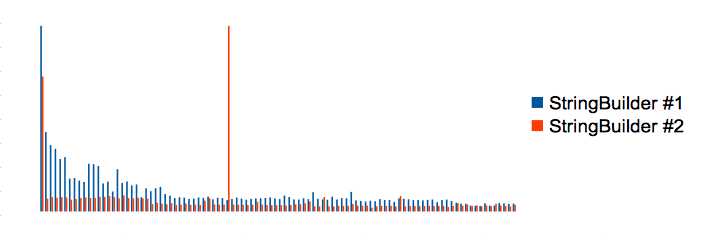
The changes of the execution times shows us what the problem was. Some optimizations had been finished in the first time measurement and the second time measurement had started from where the optimizations were finished. Thus, the first time has a disadvantage. And there is an outstanding value in the second time measurement. The value is because of garbage collection and garbage that was collected at this time include garbage which was generated during the first time measurement. Thus, conversely, the second time has a disadvantage at this point. It means right benchmarking is what making measurements to stand on the same start line and thus we need to have finish optimization and memory cleaning before measuring.


Solving the problems by yourself is OK, but there is a benchmarking framework for Groovy, GBench. GBench 0.3.0 has got a feature to solve that tiresome problems and get correct results in place of you. The following code is a rewrite using GBench. You can get a simple report that shows only execution time by setting measureCpuTime to false for disabling measurement of CPU time:
import gbench.*

new BenchmarkBuilder().run(measureCpuTime:false) {
    'StringBuilder' {
        def sb = new StringBuilder()        
        sb.append('foo')
        sb.append('bar')
        sb.append('baz')
        sb.toString()
    }
    'StringBuffer' {
        def sb = new StringBuffer()        
        sb.append('foo')
        sb.append('bar')
        sb.append('baz')
        sb.toString()
    }
}.prettyPrint()

The result of the code was as follows. Why the difference was not so much is because my environment is Server VM and operations of locking were optimized. Jeroen Borgers' article Do Java 6 threading optimizations actually work? is a good reference for optimizations around locking:
StringBuilder   244 (1)
StringBuffer    265 (1.08)

The result of the same code with disabling the optimizations (-XX:-DoEscapeAnalysis -XX:-EliminateLocks -XX:-UseBiasedLocking) was as follows:
StringBuilder   242 (1)
StringBuffer    310 (1.28)

Thursday, October 13, 2011

A way to write Groovy's AST easily

It is hard to write AST

Groovy provides a DSL to generate AST for implementation of AST transformation. But the DSL is complicated and hard to learn. Let's assume that you want to generate AST of GString:
"Hi, $name."
In this case, the DSL will be the following. Who can remember this stuff as many as the syntax?
gString 'Hi, $name.', {
    strings {
        constant 'Hi, '
        constant '.'
    }
    values {
        variable 'name'
    }
}

AST is also can be generated from code, but it does not benefit from the compiler checking (Joachim Baumann explains about it) and performance is less than the DSL. Please see the following benchmark:
@Grab('com.googlecode.gbench:gbench:0.2.2')
import gbench.BenchmarkBuilder
import org.codehaus.groovy.ast.builder.AstBuilder

def benchmarks = new BenchmarkBuilder().run {
    'DSL to AST' {
        new AstBuilder().buildFromSpec {
            gString 'Hi, $name.', {
                strings {
                    constant 'Hi, '
                    constant '.'
                }
                values {
                    variable 'name'
                }
            }
        }
    }
    'Code to AST' {
        new AstBuilder().buildFromString('"Hi, $name"')
    }
}
benchmarks.prettyPrint()

            user system cpu    real

DSL to AST     0      0   0  339918
Code to AST    0      0   0 2076590
So at the end of the day, you will cheat implementation code or test code of the DSL while writing AST. I believe that you can easily imagine it is a hard work.

How can we write the DSL easily?

I created a library that automatically generates the DSL from code to resolve the problem. The library, named AstSpecBuilder is now available here. The usage is very simple, just pass code to build method:
import astspecbuilder.*

def spec = new AstSpecBuilder().build('"Hi, $name."')

def expectedSpec =  '''\
block {
    returnStatement {
        gString 'Hi, $name.', {
            strings {
                constant 'Hi, '
                constant '.'
            }
            values {
                variable 'name'
            }
        }
    }
}
'''
assert expectedSpec == spec
It also can generate the DSL from AST, or rather the method in the above example is just a shortcut for the following code:
import astspecbuilder.*

def ast = new AstBuilder.buildFromString('"Hi, $name."')
def spec = new AstSpecBuilder().build(ast)

The indent string is 4 spaces by default but it has an option to change it. In the following example, the DSL will be indented with a tab:
def spec = new AstSpecBuilder(indent: '\t').build('"foo"')

def expectedSpec = '''\
block {
\treturnStatement {
\t\tconstant 'foo'
\t}
}
'''
assert expectedSpec == spec

Wednesday, July 20, 2011

GBench 0.2.0 released

I released GBench 0.2.0 today. GBench is a benchmarking framework for Groovy. This framework allows you to easily benchmark for Groovy programs by providing two powerful features, an AST transformation and a builder.


What's New
  • Added support for CPU time.
  • Improved the builder API.
    • Added better (Groovier) syntax to add benchmark target code blocks.
                ----
                run {
              with 'label', {
              }
          }
          ----
                ->
                ----
                run {
              label {
              }
          }
          ----
    • Added new options for run().
      • "average", "idle", "trim". See its javadoc for usage. Thanks to Yasuharu Nakano (author of GroovyServ) for providing the source code.
      • "repeat". This option is an alternative to "time" option, but "time" option still available for backward compatibility.
    • Added new APIs.
      • sum(), average(), prettyPrint(). See their javadoc for usage.
  • Changed versioning scheme.
        YY.MM.DD
        ->
        Major.Minor.Micro


Resolved Issues
  • The name of the system property to specify @Benchmark's default handling contains the old domain.
        "groovybenchmark.sf.net.defaulthandle"
        ->
        "gbench.defaulthandle"


Examples
  • AST transformation Example:

  • Builder Example:

Please try and let me know your feedback (via this blog's comment, the project's issue tracking system, or Twitter:@nagai_masato). Your feedback helps GBench to continue to impove.